Photoshop Tutorials: Create a Wonderful Midnight Photo Manipulation in Photoshop |  |
| Create a Wonderful Midnight Photo Manipulation in Photoshop Posted: 02 Dec 2013 12:00 AM PST Preview of Final Results
Tutorial Resources
Step 1Open the ‘Window and Woman’ stock.
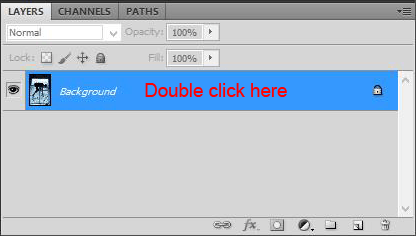
Step 2Since we have to work on this layer we have to unlock it. Double click on the layer and name it ‘Main’.
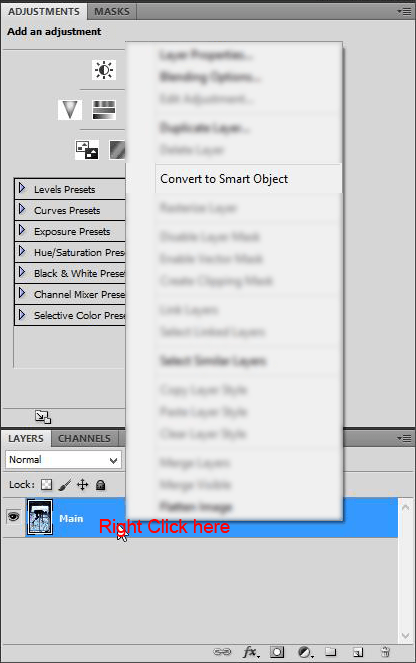
Step 3Now that the layer is unlocked you have to convert it to Smart Object. Right click on the ‘Main’ layer and choose ‘Convert to Smart Object’.
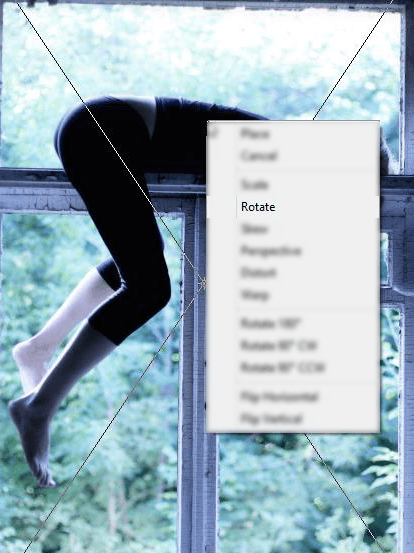
Step 4Now we have to rotate a bit the image. Go to Edit > Transform. Right click on the image and choose ‘Rotate’. Then rotate the image to make it straight.
Step 5Obviously we have to crop the empty parts. Grab the Crop Tool and build a selection so that the empty areas are out of it. When you are done right click on the image and choose ‘Crop’.
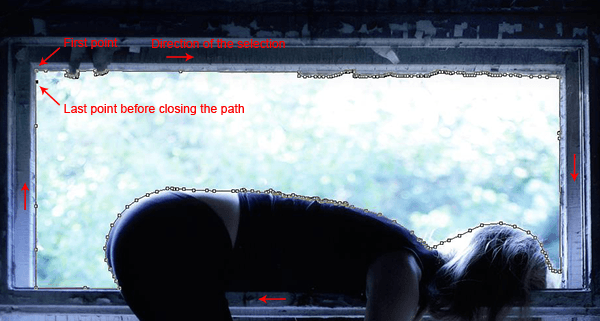
Step 6Now we have to hide the part of the background outside the window so we can replace it with a dreamy sky. We will have to do it in several steps. Grab the Pen Tool and start to make a selection of a part you want. I will start from the higher part. The first point you make with the Pen Tool is the beginning of your selection. By adding some other anchor points you will be building your path. When you want end your path add the last point above the first point.
|





| You are subscribed to email updates from Photoshop Tutorials To stop receiving these emails, you may unsubscribe now. | Email delivery powered by Google |
| Google Inc., 20 West Kinzie, Chicago IL USA 60610 | |
No comments:
Post a Comment